Introducing the New RoutineHub Feed: A Better Way to Stay Updated

The new RoutineHub Feed is designed to help the community discover, follow, and react to shortcut updates in real time. Instead of only browsing shortcut pages individually, you can now stay updated through organized Channels.
This guide will walk you through how it works and how to use it effectively.
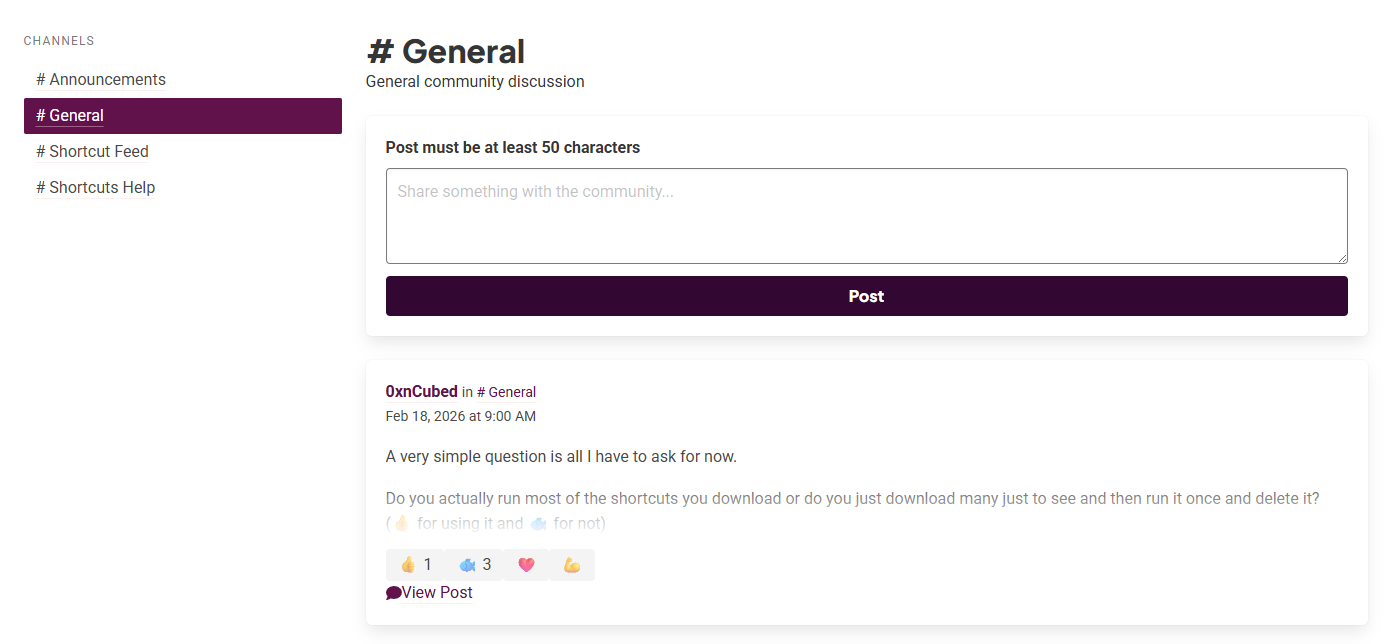
1️.- Understanding Channels
The feed is organized into channels (similar to Discord-style structure). Currently, you’ll find:
- # Announcements – Official platform updates.
- # General – Open community discussions.
- # Shortcut Feed – Automated posts for new and updated shortcuts.
- # Shortcuts Help – Technical questions and support.
If you want to stay updated on new releases and updates, the most important one is:
🔥 # Shortcut Feed
This channel automatically displays:
- Newly published shortcuts
- Shortcut updates
- Version numbers
- Release notes
2️ .- Read a Post
Each post inside # Shortcut Feed includes:
- 👤 The username of the developer
- 🕒 Date and time
- 🆕 Whether it’s a new shortcut or an update
- 🔢 Version number (if applicable)
- 📝 Release notes
- 🔗 A “View Post” button to see full details
For example:
- A developer publishes a brand-new shortcut.
- A creator updates their shortcut to a new version with improvements or bug fixes.
Everything appears automatically, so you never miss important changes.
3️ .- How to Interact with the Feed
Each post supports quick reactions:
- 👍 Like
- ❤️ Love
- 💪 Support
- 🐟 A fun community reaction
These reactions help highlight popular shortcuts and show support for developers.
💡 Tip: If you appreciate a shortcut, reacting to updates increases its visibility and encourages the creator.
4️.- How to Post in the Feed
Some channels allow you to write directly. You’ll see a field that says:
“Share something with the community…”
⚠️ Important:
Your post must be at least 50 characters long.
You can use this space to:
- Announce a major update
- Explain important improvements
- Share roadmap details
- Communicate breaking changes
5️ .- Using the Feed Strategically (For Developers)
If you build shortcuts, the new feed is a powerful tool to:
- 📢 Keep users informed
- 🚀 Build anticipation before major releases
- 🛠 Explain technical changes
- 💬 Receive faster feedback
Suggestion:
Avoid posting only “Minor changes.” Add context. Explain what actually improved and why it matters to users.
6️ .- Why the New Feed Matters
The feed transforms RoutineHub from just a shortcut repository into a more dynamic community experience where:
- Updates don’t go unnoticed
- Developers receive immediate support
- Users discover improvements in real time
It’s a major step toward a more interactive and social RoutineHub.
Made for the Comunity
The new RoutineHub Feed isn’t just a list of updates.
It’s the heartbeat of the community.
If you’re a user: check # Shortcut Feed regularly.
If you’re a developer: use it to communicate your work clearly and consistently.
And most importantly — engage. The feed becomes more powerful when the community participates.