What Is an AI Plugin?

AI assistants can already help users write, research, plan, analyze information, and solve problems. However, their usefulness can increase significantly when they are equipped with specialized workflows designed for a particular type of work.
That is the purpose of an AI Plugin.
An AI Plugin is an installable package that expands what an AI assistant can do by adding structured Skills, Commands, instructions, and reusable workflows.
Instead of repeatedly explaining how a task should be completed, users can install a Plugin that gives the AI a predefined set of capabilities for a specific purpose.
A Plugin can transform a general AI assistant into a more specialized tool for product management, software development, content creation, research, productivity, customer support, or many other areas.
How Does an AI Plugin Work?
An AI Plugin bundles several related capabilities into one installable package.
Depending on the Plugin, it may include:
- AI Skills
- Commands
- Specialized instructions
- Repeatable workflows
- Project conventions
- Documentation
- Configuration files
- Supporting resources
Once installed, these components become available inside a compatible AI assistant.
The user can then activate a specific Command or ask the AI to apply one of the included Skills.
For example, instead of manually describing the full process for creating a product requirements document, a user could install a product management Plugin that already knows how to:
- Capture the original product idea
- Identify user needs
- Organize requirements
- Write a complete PRD
- Break the plan into development issues
- Prepare project updates
- Summarize completed work
The Plugin gives the AI a reusable system for completing those tasks consistently.
A Real Example: RoutineHub Product
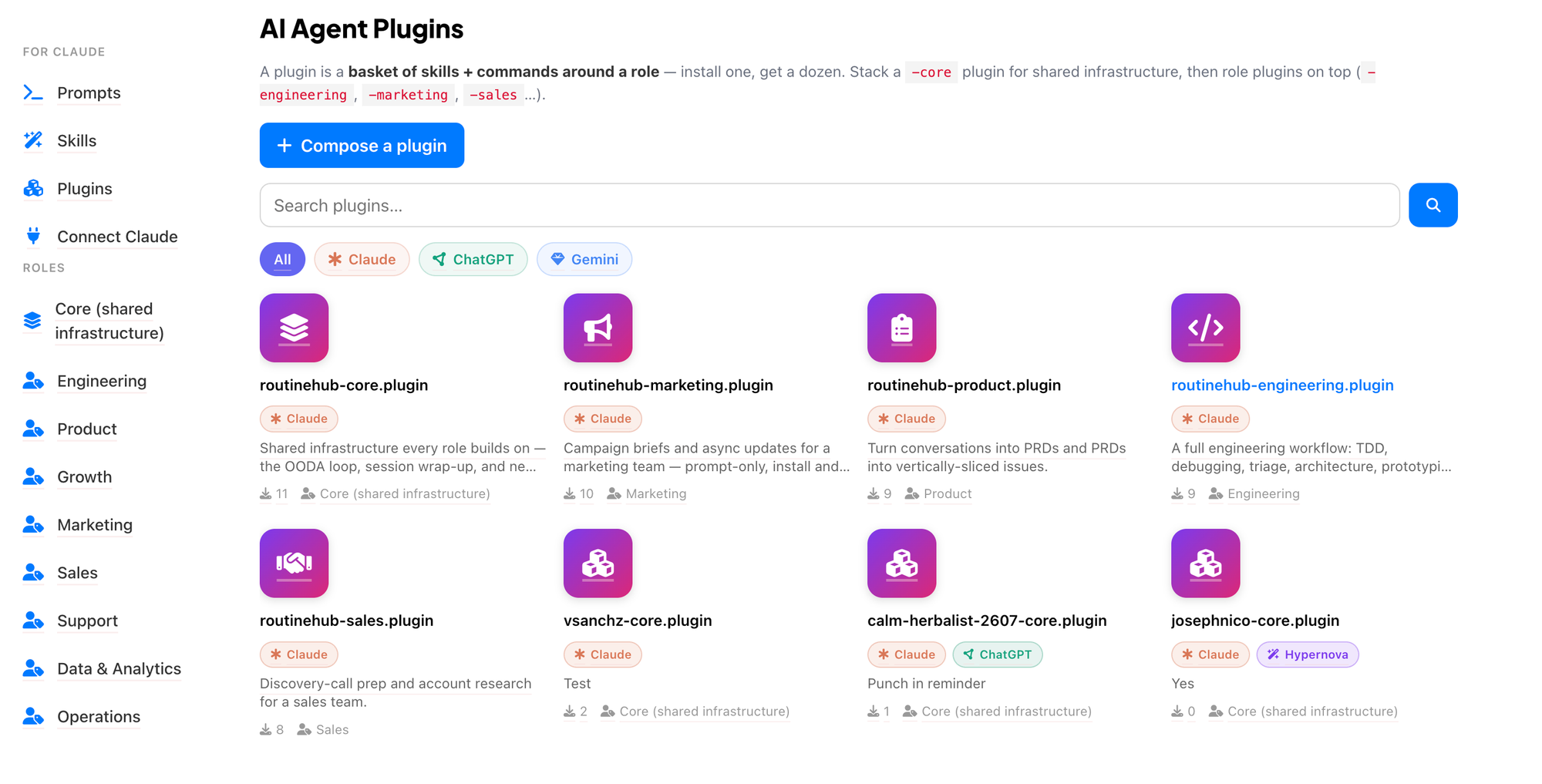
RoutineHub Product is an example of an AI Plugin available on RoutineHub.
Its purpose is to help users turn conversations into product requirements documents and transform those PRDs into vertically sliced development issues.
Instead of using a single prompt, the Plugin provides a complete product workflow through multiple Skills and Commands.
It includes three Commands:
/new-setup
This Command helps bootstrap a new project or client.
It can gather project context, establish conventions, and create an initial project brief.
This is useful at the beginning of a project when the AI needs to understand the product, team, objectives, and working structure.
/wrap
This Command helps close a work session cleanly.
It can summarize completed work, prepare a commit, and update the current project state.
This makes it easier to maintain continuity between different work sessions.
/standup
This Command converts recent activity into a concise asynchronous standup update.
It organizes progress into:
- Done
- Doing
- Blocked
This can save time for developers, product managers, and remote teams that regularly share project updates.
The Plugin also includes three Skills:
To PRD
This Skill turns the current conversation and the AI’s understanding of the codebase into a complete product requirements document.
To Issues
This Skill breaks a plan or PRD into independently actionable, vertically sliced issues.
Instead of creating large and vague tasks, it helps organize the work into smaller items that can be assigned and completed separately.
This Skill stress-tests a product plan against existing documentation and the current domain model.
It can help identify inconsistencies, unclear terminology, missing requirements, or assumptions that need additional review.
Together, these Commands and Skills create a complete workflow rather than solving only one isolated task.
Plugins vs. Skills
Plugins and Skills are related, but they are not the same.
A Skill is a reusable set of instructions designed to help an AI complete a particular task.
A Plugin is a broader package that may contain several Skills, Commands, and supporting resources.
For example:
- A Skill may teach an AI how to create a PRD.
- Another Skill may teach it how to turn that PRD into issues.
- A Command may start a new project setup.
- Another Command may prepare a standup update.
- A Plugin can bundle all of these capabilities together.
A Skill usually focuses on one specific ability.
A Plugin combines several related abilities into a complete toolkit.
Plugins vs. Prompts
A prompt is typically a direct instruction given to an AI.
For example:
“Create a product requirements document for a mobile hotel booking app.”
The result depends on the information included in the prompt and how the AI interprets it.
A Plugin provides a more structured and reusable experience.
It can define:
- Which information should be collected
- Which process the AI should follow
- Which Commands are available
- How the final output should be organized
- How the AI should interact with project files or documentation
- How different tasks should connect with each other
A prompt may help complete one request.
A Plugin can support an entire workflow.
What Are Commands?
Commands are predefined actions included inside a Plugin.
They give users a simple way to activate a specific workflow.
Commands commonly begin with a slash, such as:
/new-setup/wrap/standup
Instead of writing a long explanation, the user can run the Command and allow the Plugin to guide the AI through the correct process.
Commands are especially useful for tasks that happen frequently and should follow a consistent structure.
A development Plugin, for example, could include Commands for:
- Starting a project
- Reviewing code
- Creating issues
- Generating documentation
- Preparing releases
- Closing a work session
What Are Skills?
Skills provide specialized instructions that teach the AI how to complete a particular type of task.
A Skill may define:
- The AI’s role
- The objective of the task
- The steps it must follow
- The information it should inspect
- The questions it should ask
- The expected output structure
- The quality standards it should maintain
Skills can be activated when the user requests a relevant task.
For example, a “To PRD” Skill may guide the AI through analyzing the conversation, reviewing the available project context, identifying requirements, and generating a structured PRD.
The user does not need to recreate those instructions every time.
Why Are AI Plugins Useful?
AI Plugins make advanced workflows easier to reuse, share, and install.
They Save Time
Users do not need to repeatedly write detailed instructions for the same type of work.
Once the Plugin is installed, its Commands and Skills remain available for future tasks.
They Improve Consistency
A Plugin can define the same process, structure, and quality rules every time it is used.
This helps reduce differences between results generated during separate sessions.
They Bundle Complete Workflows
Many professional tasks involve more than one step.
A Plugin can connect multiple stages of a process, such as:
- Gathering project information
- Creating a brief
- Writing a PRD
- Breaking the PRD into issues
- Tracking progress
- Preparing a standup
- Closing the work session
Instead of using disconnected prompts, the Plugin provides a unified workflow.
They Make AI More Specialized
A general AI assistant can become a specialized product manager, developer assistant, research tool, or content workflow assistant after installing the appropriate Plugin.
The Plugin provides the additional instructions and capabilities needed for that role.
They Can Be Shared
Creators can package their best AI workflows into Plugins and publish them for other users.
This allows teams, developers, and AI creators to share complete systems rather than isolated prompts.
How Are RoutineHub Plugins Installed?
RoutineHub Plugins can be installed in different ways depending on the supported AI assistant.
For Claude, a user may connect RoutineHub through MCP using their RoutineHub API key.
After the connection is configured, the user can ask Claude to install a Plugin directly from RoutineHub.
For example:
“Install RoutineHub Product from RoutineHub.”
Some Plugins can also be downloaded as ZIP files and installed manually.
This gives users the flexibility to choose between a direct installation process and a downloadable package.
What Is MCP?
MCP stands for Model Context Protocol.
It provides a standardized way for AI assistants to connect with tools, services, resources, and external platforms.
In the case of RoutineHub, MCP can allow a compatible assistant such as Claude to access and install Plugins available through the RoutineHub platform.
This makes the installation process easier because the user can connect RoutineHub once and then request Plugins through a natural-language conversation.
Who Can Benefit from AI Plugins?
AI Plugins can be useful for both technical and nontechnical users.
Developers can use Plugins to:
- Set up projects
- Review code
- Generate technical documentation
- Create development issues
- Prepare commits
- Manage releases
Product teams can use Plugins to:
- Capture product ideas
- Write PRDs
- Review requirements
- Break projects into tasks
- Generate standup updates
Writers and marketers can use Plugins to:
- Research topics
- Create content briefs
- Draft articles
- Adapt content for different platforms
- Review and improve copy
Businesses can use Plugins to:
- Standardize internal processes
- Improve customer support workflows
- Analyze information
- Prepare reports
- Organize recurring tasks
The possibilities depend on the Skills and Commands included in each Plugin.
What Makes a Good AI Plugin?
A useful Plugin should solve a clear problem and provide a complete, understandable workflow.
A good Plugin usually has:
A Specific Purpose
Users should quickly understand what the Plugin helps them accomplish.
Related Skills and Commands
The included components should work together as part of the same workflow.
Clear Documentation
Users should know how to install the Plugin, which Commands are available, and when to use each Skill.
Useful Outputs
The Plugin should produce practical results that users can apply directly to their work.
Consistent Behavior
Its workflows should follow clear rules and generate predictable results.
A Focused Scope
A Plugin does not need to solve every possible problem.
The best Plugins often focus on one area and handle it well.
Why Publish Plugins on RoutineHub?
RoutineHub provides a marketplace where creators can publish, share, and distribute AI Plugins.
Publishing a Plugin allows creators to:
- Share complete AI workflows
- Package multiple Skills and Commands together
- Reach users looking for specialized AI tools
- Build a public portfolio
- Receive feedback from the community
- Improve and publish new versions
- Track changes through a changelog
Users can review the Plugin’s description, supported platform, category, version, included Commands, Skills, contributors, installation options, and pricing before downloading it.
This helps users understand exactly what the Plugin contains and how it can support their work.
Final Thoughts
An AI Plugin is an installable package that expands an AI assistant with specialized Skills, Commands, instructions, and workflows.
Unlike a single prompt, a Plugin can support an entire process.
Unlike an individual Skill, a Plugin can combine multiple related capabilities into one complete toolkit.
RoutineHub Product demonstrates how this works by combining product planning, PRD creation, issue generation, project setup, standups, and session wrap-ups in one package.
As AI assistants become a larger part of everyday work, Plugins will make it easier for users to install proven workflows and transform general AI tools into specialized assistants.
Explore the AI Plugins available on RoutineHub, install the tools that match your workflow, or publish your own Plugin for the community.